
Contents
- The 8 details every invoice needs
- VAT on the invoice: the three rates
- The payment part: a QR-bill since 2022
- Setting a payment term and chasing late payers
- Example invoice: what the finished document looks like
- Private individual or self-employed: who can issue an invoice?
- Checklist: the most common mistakes before sending
- Frequent questions about invoicing in Switzerland
How to write an invoice in Switzerland
A Swiss invoice has no prescribed layout. What matters is the content: who is billing whom for what, how much, by when, and to which account. This guide walks through every part, from the sender block to the QR payment part, shows a complete example invoice with VAT, and closes with a checklist of the mistakes that get invoices sent back. It applies to sole proprietors, limited companies, freelancers and private individuals billing a one-off job.
By Payvetia · Updated on
Checklist: 8 required details
0 of 8 tickedSaved locally in your browser.
The 8 details every invoice needs
The law only prescribes invoice content for VAT-registered businesses, in Art. 26 of the Swiss VAT Act. In practice every client expects the same details, because their bookkeeping cannot post the invoice without them. Leave one out and the invoice comes back, or sits unpaid.
- 1Sender: your name or company with street, postcode and town. If you are VAT-registered, add your VAT number in the format CHE-123.456.789 MWST.
- 2Recipient: the client's name and full address. For companies, exactly as entered in the commercial register, or their accounts department will reject it.
- 3Invoice date: the day you issue the invoice. The payment term runs from here.
- 4Invoice number: unique and sequential, for example 2026-014. Two invoices sharing a number is the classic bookkeeping error.
- 5Service and service date: what you delivered and when. For services, a period is enough, such as "Consulting, March 2026". The more specific, the fewer queries.
- 6Line items and amount: each item with quantity, unit price and line total, then subtotal and total in CHF. Use the Swiss number format: CHF 1'250.00.
- 7VAT details, if registered: rate and VAT amount, separated per rate, plus whether prices are shown including or excluding VAT. Without VAT registration this line is left off entirely.
- 8Payment details: your IBAN or QR-IBAN and the payment term. In Switzerland this means a QR payment part that any Swiss banking app can scan.
VAT on the invoice: the three rates
Whether VAT belongs on your invoice depends on whether you are entered in the VAT register. Registration becomes mandatory at CHF 100'000 annual turnover from taxable supplies. Below that you may register voluntarily, but you do not have to. If you are not registered, your invoice carries no VAT line, no rate and no VAT number. Show VAT anyway and you owe the amount to the tax administration.
If you are registered, one of these three rates applies to each line item since 1 January 2024:
| Rate | Applies to | Example |
|---|---|---|
| 8.1 % | standard rate for most goods and services | consulting, web design, trades, electronics |
| 2.6 % | reduced rate for everyday essentials | food, books, newspapers, medicines |
| 3.8 % | special rate for accommodation | hotel night including breakfast |
On the invoice you show the net amount, the rate and the VAT amount per rate. Most self-employed people only ever need the standard 8.1 %. Whether you report to the FTA using the effective method or the net tax rate method changes nothing on the invoice itself. The current rates are published by the Federal Tax Administration; if you are unsure about your own obligation, ask your fiduciary. Our page on VAT invoices covers the details of showing VAT correctly.
The payment part: a QR-bill since 2022
The red and orange payment slips are gone. Since 1 October 2022 Switzerland uses the QR-bill: a payment part in the lower third of the page with the Swiss QR Code, which encodes IBAN, amount, creditor address and optionally a reference. Your client scans the code with their banking app, checks the pre-filled details and confirms. No more typing IBANs, and no more transposed digits.
The layout of the payment part is defined by the SIX QR-bill standard: field order, font sizes, Swiss cross in the centre of the code. A QR code from a generic online generator that only contains text is rejected by banking apps. With a normal IBAN you create a QR-bill without a structured reference; with a QR-IBAN you add the QR reference, which lets incoming payments be matched automatically. Payvetia builds the payment part to this standard on every invoice and generates the reference number automatically when you use a QR-IBAN.
Setting a payment term and chasing late payers
Switzerland has no statutory payment term; you set it yourself and print it on the invoice, for example "Payable within 30 days". Thirty days is the norm. For small amounts or new clients, 10 or 14 days are just as legitimate. What matters is that a term appears at all, because otherwise nobody knows when the invoice is overdue.
Once the term has passed, you send a reminder. Under Art. 102 of the Code of Obligations, the reminder puts the debtor in default; from then on you may charge default interest. If the invoice states a fixed payment date, default occurs even without a reminder. Common practice is two or three reminder levels about two weeks apart: a friendly payment reminder first, then a formal reminder with a new deadline, and finally notice of debt enforcement. In Payvetia you create the reminder straight from the open invoice; items, amount and invoice number carry over, and the invoice list shows you which invoices are overdue.
Example invoice: what the finished document looks like
The demo company Atelier Nordwand GmbH bills Muster AG for a website. The invoice is subject to VAT and issued at the standard rate of 8.1 %. This is the PDF Payvetia generates from it, including the QR payment part at the bottom of the page:
| Item | Quantity | Amount |
|---|---|---|
| Concept and consulting | 5 h at CHF 250.00 | CHF 1'250.00 |
| Website implementation | flat fee | CHF 3'000.00 |
| On-site photography | 1 day | CHF 750.00 |
| Subtotal excl. VAT | CHF 5'000.00 | |
| VAT 8.1 % | CHF 405.00 | |
| Total incl. VAT | CHF 5'405.00 |
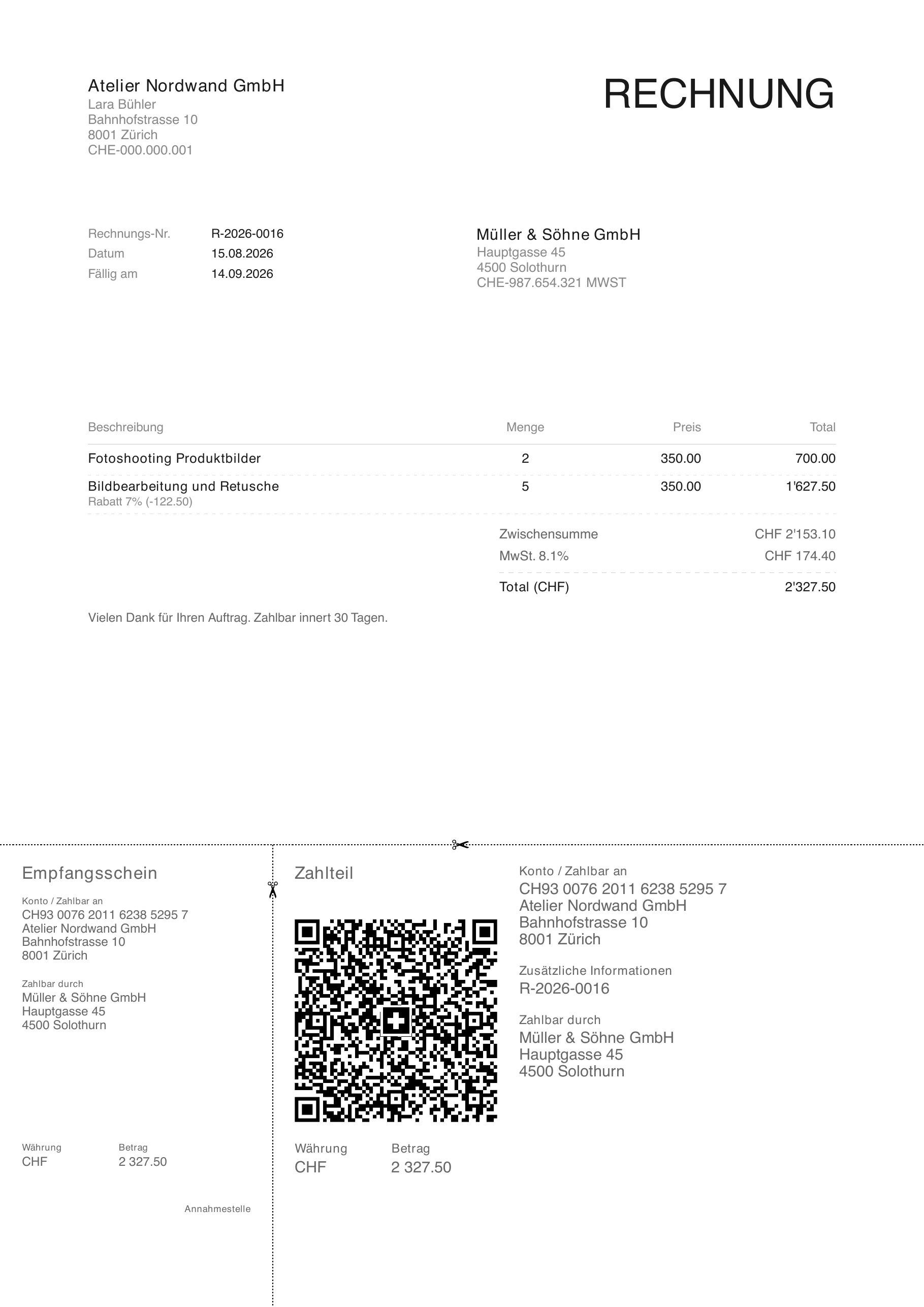
Atelier Nordwand GmbH with street, postcode, town and UID, the way the business presents itself. VAT-registered businesses add the VAT number here.
If Atelier Nordwand were not VAT-registered, the lines "VAT 8.1 %" and "excl. VAT" would disappear and the total would read CHF 5'000.00. Everything else stays the same. Payvetia calculates subtotal, VAT and total from the line items, assigns the invoice number permanently on the first PDF and increments it on the next invoice. You choose the document language per invoice: German, French, Italian or English.
Private individual or self-employed: who can issue an invoice?
Anyone can issue an invoice. You need neither a company nor an entry in the commercial register. If you did your neighbour's garden or designed a logo for a club as a private individual, you write an invoice with exactly the same details as a business: sender, recipient, date, number, service, amount, IBAN. Only the VAT line is missing, because you are not in the VAT register.
For self-employed people with a sole proprietorship the invoice looks the same too. The difference lies not in the document but around it: you must number and file your invoices and keep them for ten years under Art. 958f of the Code of Obligations, and VAT joins in from CHF 100'000 turnover. Whether your activity counts as self-employment and what that means for social insurance is a question for your compensation office or fiduciary; the invoice itself does not change.
Checklist: the most common mistakes before sending
Run through these points before you hit send. Each of them costs days in practice, because the invoice comes back or gets stuck in the client's accounting:
- 1Duplicate or missing invoice number: one number per invoice, sequential, no gaps. For cancellations, issue a credit note instead of reusing the number.
- 2VAT shown without registration: no VAT number, no VAT line. Conversely: if registered, it must not be missing.
- 3Wrong or no rate: 8.1 % for almost everything, 2.6 % and 3.8 % only for the listed exceptions. The rate appears on each line or in a per-rate summary.
- 4No payment term: "Payable within 30 days" or a fixed date. Without a term there is no default.
- 5IBAN as text instead of a QR payment part: an IBAN in running text gets typed out, with an error rate. A QR payment part gets scanned.
- 6Wrong amount format: CHF 1'250.00 with an apostrophe as thousands separator and a dot as decimal separator. Cash payments round to 5 centimes.
With invoicing software most of these mistakes disappear, because number, amounts, VAT and QR payment part are calculated from your master data. Payvetia runs in the browser and in the iOS app; you save clients and line items once, and from then on a new invoice is a matter of selecting and sending. Your data is hosted in Switzerland.
Frequent questions about invoicing in Switzerland
You need sender, recipient, invoice date, a sequential invoice number, the service with date or period, line items with a total in CHF, rate and VAT amount if you are VAT-registered, and your payment details with a term. As a PDF with QR payment part, the invoice is ready to send by email.