
Contents
- What belongs on a freelancer invoice
- Hourly rate, flat fee or day rate: how to write the line item
- Worked example: web project with hours and expenses
- With or without VAT as a freelancer
- Passing on expenses and outlays
- Payment term, advance payment and reminder
- Clients abroad: currency, language and the QR payment part
- Frequent questions about freelancer invoices
Freelancer invoice Switzerland: how to write one properly
As a freelancer you invoice in your own name, usually for hours rather than units, sometimes with expenses on top, sometimes to clients outside Switzerland. This guide covers what the invoice must contain, how to write hours, flat fees and day rates as line items, and what a complete example looks like, once with VAT and once without. It closes with how Payvetia shortens the path from quote to reminder.
By Payvetia · Updated on
Checklist: 8 required details
0 of 8 tickedSaved locally in your browser.
What belongs on a freelancer invoice
A freelancer invoice follows the same rules as any other Swiss invoice. Art. 26 of the VAT Act defines the content for VAT-registered businesses, and even without registration your client's bookkeeping expects exactly these details:
- 1Your name and address: as you trade. You don't need a company for this; your first and last name with your address is enough. If you are VAT-registered, add the VAT number.
- 2Client name and address: the company that hired you, not the contact person. Larger clients often require a purchase order or project number, otherwise the invoice sits in accounts payable.
- 3Invoice date and payment term: the issue date plus the term, typically 30 days in Switzerland.
- 4Invoice number: unique and sequential, for example 2026-014.
- 5Service with service period: what you did and when. On hourly invoices the period matters more than on unit invoices, because otherwise the client can't check your hours.
- 6Line items, subtotal and total: in CHF, or in the agreed foreign currency. If VAT-registered, add rate and tax amount.
- 7Payment details: your IBAN or QR-IBAN, ideally as a QR-bill payment part according to the SIX standard.
Hourly rate, flat fee or day rate: how to write the line item
Most questions about freelancer invoices come down to one line: the item. With an hourly rate you keep quantity and unit separate: quantity 12, unit "hrs", rate CHF 120.00, amount CHF 1'440.00. The service period goes into the item description or on its own line underneath, for example "Service period 3 to 7 August 2026". Write half and quarter hours as decimals: 12.5 hrs, not 12 hrs 30 min.
For a flat fee the quantity is 1 and the rate is the agreed amount. The description should say what the fee covers, such as "Logo design as per quote 2026-009, incl. two rounds of revisions". That keeps it clear later what was included and what wasn't. A day rate follows the same pattern as an hourly rate, with "day" as the unit and the agreed day rate as the price. Half days are written as 0.5.
A detailed timesheet with individual working days does not belong on the invoice itself. If the client wants one, attach it as a separate sheet and refer to it in the item. The invoice stays on one page and the client's bookkeeping finds the total at a glance.
Worked example: web project with hours and expenses
This is what the items section of a freelancer invoice looks like. The sender is the demo company Atelier Nordwand GmbH, the client is Muster AG, invoice number 2026-014, service period 3 to 14 August 2026, payment term 30 days:
| Item | Quantity | Rate | Amount |
|---|---|---|---|
| Concept and layout, service period 3 to 7 August 2026 | 12 hrs | CHF 120.00 | CHF 1'440.00 |
| Website build, service period 10 to 14 August 2026 | 20 hrs | CHF 120.00 | CHF 2'400.00 |
| Expenses: travel and meals, 2 days on site in Zurich, receipts attached | 1 | CHF 160.00 | CHF 160.00 |
| Subtotal | CHF 4'000.00 | ||
| VAT 8.1 % | CHF 324.00 | ||
| Total | CHF 4'324.00 |
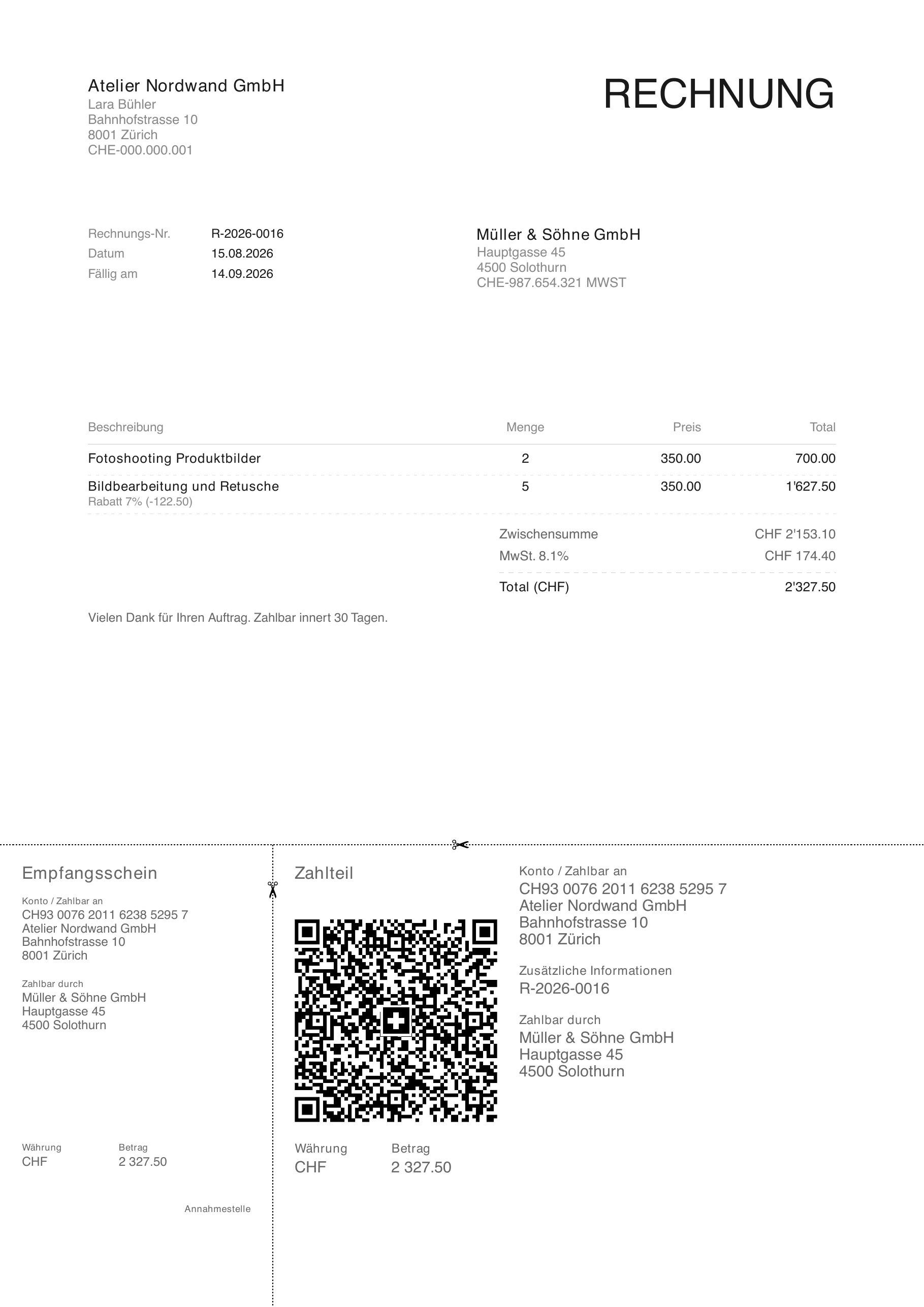
Atelier Nordwand GmbH with street, postcode, town and UID, the way the business presents itself. VAT-registered businesses add the VAT number here.
If you are not VAT-registered, the line "VAT 8.1 %" and the VAT number in the header disappear. The subtotal then becomes the total: CHF 4'000.00. Everything else stays the same, including the expenses item.
Write amounts with an apostrophe as the thousands separator and two decimals, so CHF 1'440.00. Rounding to 5 centimes is only needed for cash payments; for bank transfers the exact amount stands.
With or without VAT as a freelancer
Whether your invoice carries a VAT line is decided neither by the client nor by the size of the individual invoice, but by your entry in the VAT register. Below CHF 100,000 in annual revenue you are exempt and invoice without VAT: no VAT line, no rate, no VAT number. Anyone who shows VAT without being registered owes that amount to the tax administration.
If you are registered, every invoice needs your rate (8.1 %, 2.6 % or 3.8 %), the tax amount and your VAT number in the format CHE-XXX.XXX.XXX MWST. Whether you settle by the effective method or the net tax rate changes nothing on the invoice. The current rates are published by the Federal Tax Administration. Whether and when you need to register is a question for your accountant.
In Payvetia you set VAT once in your profile. Without registration the line stays off all documents; with registration the app calculates rate and amount per item. The reports show you a preview by the effective method and by the net tax rate. Documents with VAT are a Pro feature.
Passing on expenses and outlays
Travel, hotel nights, materials or licences you pay for on the client's behalf go on the invoice as their own line item, not hidden inside the hourly rate. Say in the description what the outlay was for and attach the receipts or reference them in the item. Clients who have to check expenses will thank you.
Agree beforehand what the client will cover. The easiest place for that is the quote: "Expenses at cost against receipts" or "Mileage at a flat CHF 0.70 per kilometre". Then there is no discussion at invoice time. Larger outlays go on the current invoice rather than waiting for the end of the project.
In Payvetia you enter an expense item like any other item and save it if it comes up regularly. Saved items are one tap away on the next invoice.
Payment term, advance payment and reminder
30 days is the usual payment term in Switzerland; shorter terms are allowed and common for small amounts. What matters is that the term is printed on the invoice. In Payvetia you set your default term once and change it per invoice when a client has agreed something different.
On longer projects you don't invoice everything at the end. An advance invoice at the start and a final invoice for the remaining balance are standard practice among freelancers, and not only on large projects. If a client pays only part, you record the partial payment on the invoice in Payvetia; the remainder stays open and the invoice keeps showing in the list of outstanding items.
If the client hasn't paid after the term expires, you send a reminder. Under Art. 102 of the Code of Obligations, the reminder puts the debtor in default when no fixed payment date was agreed. In Payvetia you create the reminder straight from the invoice: items, amount and reference are carried over, and at most you add a new deadline and a sentence.
Clients abroad: currency, language and the QR payment part
Many freelancers work for clients in Germany, France or the United States. On the invoice, mainly the language and the currency change. Issue it in the language you negotiated in and in the currency you agreed on. In Payvetia you pick the document language per document: German, French, Italian or English. Items, amounts and payment notes then appear in that language.
Invoices in EUR, USD or GBP are created in the foreign currency; the app records the CHF exchange rate as of the invoice date so your bookkeeping can report the revenue in CHF. One restriction applies to the QR payment part: the Swiss QR code is designed for payments in CHF and EUR to a Swiss account. For those two currencies Payvetia attaches the payment part; for other currencies the app prints the bank details you stored for that currency.
Whether your work for a client abroad is invoiced with or without VAT depends on the place of supply. That is a question for your accountant, not for invoicing software. Payvetia issues the invoice the way you set it up.
Here is what a typical freelance job looks like with Payvetia: you write the quote from your saved items and your saved client. When the client accepts, you convert the quote to an invoice with one tap; items and client data carry over, the invoice number is assigned with the first PDF and increments automatically. The QR-bill payment part goes on the PDF with your IBAN or QR-IBAN.
You email the invoice straight from the app, see whether it is open or paid, record partial payments and, if needed, create the reminder from the same invoice. All of this works in the browser and in the iOS app, with data hosted in Switzerland.
Frequent questions about freelancer invoices
Put your name and address, the client, a date, a sequential number, the service with its period, the line items with the total and your payment details on one document. Whether it comes out of an app as a PDF or out of a template makes no difference to its validity. A QR-bill payment part makes paying easier for the client.